

Architectural Decisions in Large-Scale iOS Projects: Why We Prefer Static Frameworks
What is a Static Framework in iOS?
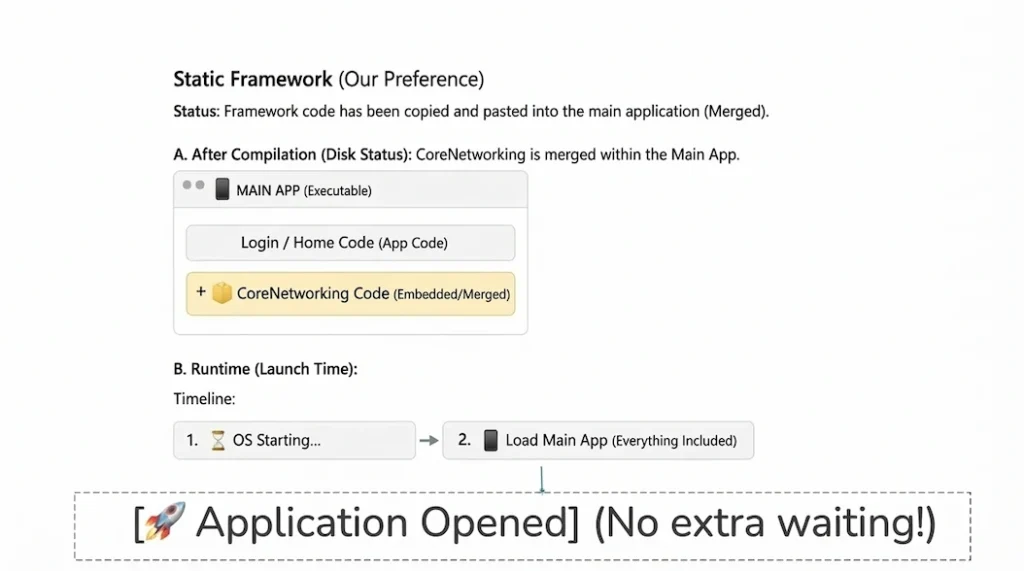
When building large-scale applications, choosing the right iOS Static Framework architecture is a crucial decision for developers. A Static Framework is essentially a pre-compiled package of code. You can think of it like this:
Let’s say I have a custom library called CoreNetworking (which you can find on my GitHub). If we build this as a Static Framework, here is exactly what happens during the Xcode build process:
- Xcode takes all the raw code inside
CoreNetworking. - It physically copies that code directly into the main codebase of our Main App.
- The final result is a single, unified, executable application file.
In other words, by the time your app is shipped to the App Store or installed on a user’s iPhone, CoreNetworking no longer exists as a separate entity. It has been seamlessly woven into the main application’s DNA.
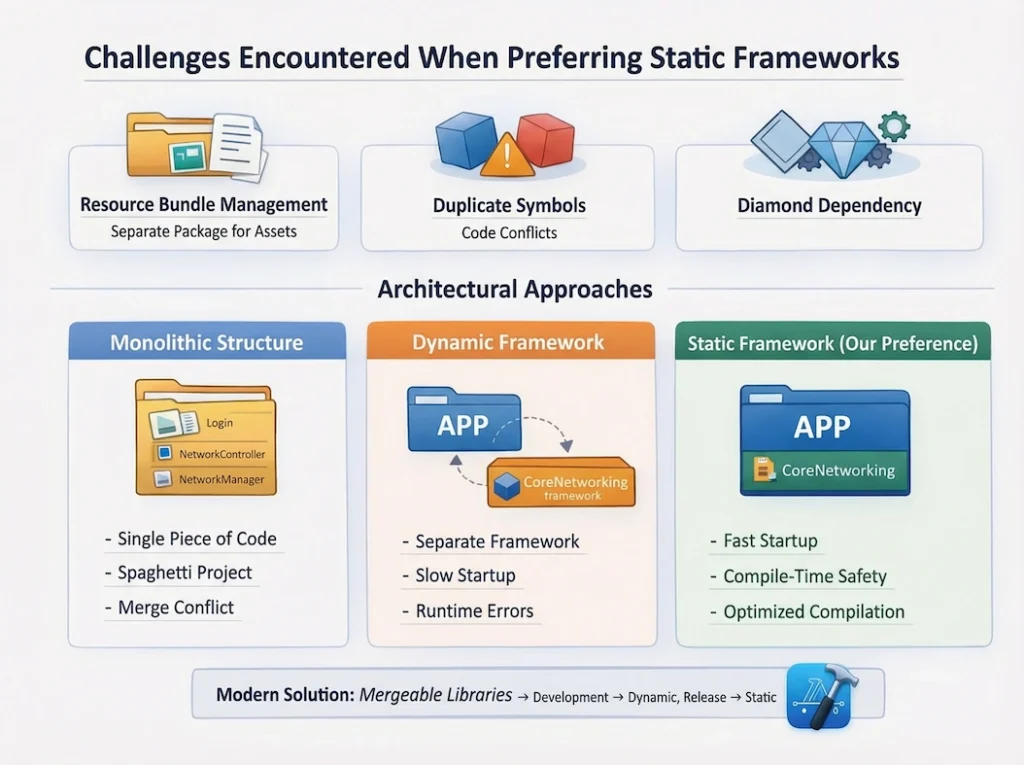
Why Should We Use Static Frameworks? (The Advantages)
A. Blazing Fast Launch Times
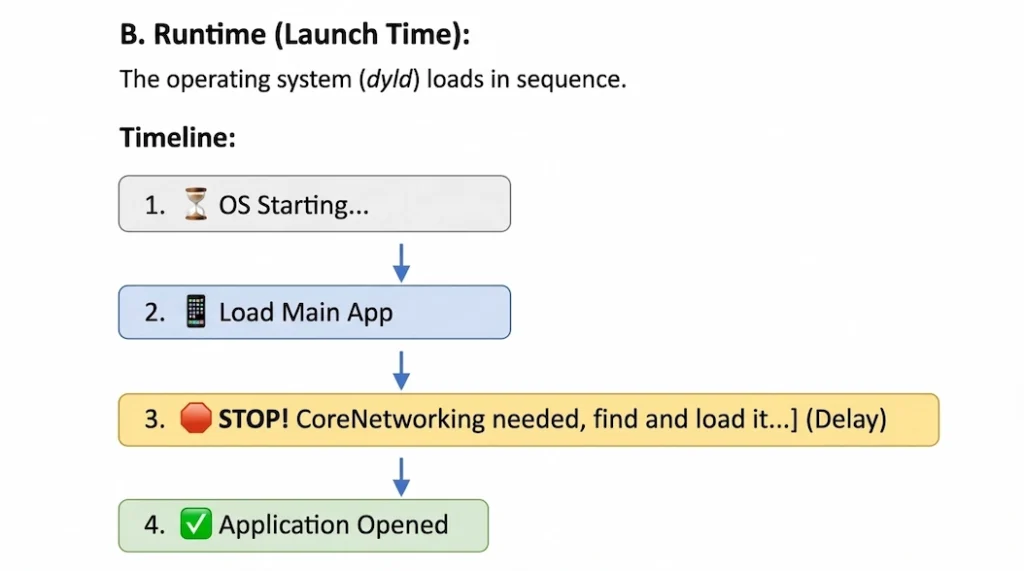
When a user taps your app icon, the iOS operating system starts loading your application into memory.
- If it’s Static: The framework’s code is already baked into the main app. iOS simply reads a single executable file and launches the app. It opens in a blink of an eye.
- If it’s Dynamic: iOS boots up the main app, realizes, “Oh wait, I need
CoreNetworkingto run this,” and pauses to find, load, and link that external file into memory. As your framework count grows, this process can delay your app’s launch time by several precious seconds.
B. Compile-Time Safety
When using a static framework, if there is a bug or a missing file within the framework, Xcode will catch it during compile time. You will get a familiar “Build Failed” error, allowing you to fix the issue immediately. This drastically reduces the risk of runtime crashes for your users.
What Happens If We Don’t Use Them? (The Alternatives)
If we decide against using Static Frameworks, we generally have two paths to choose from:
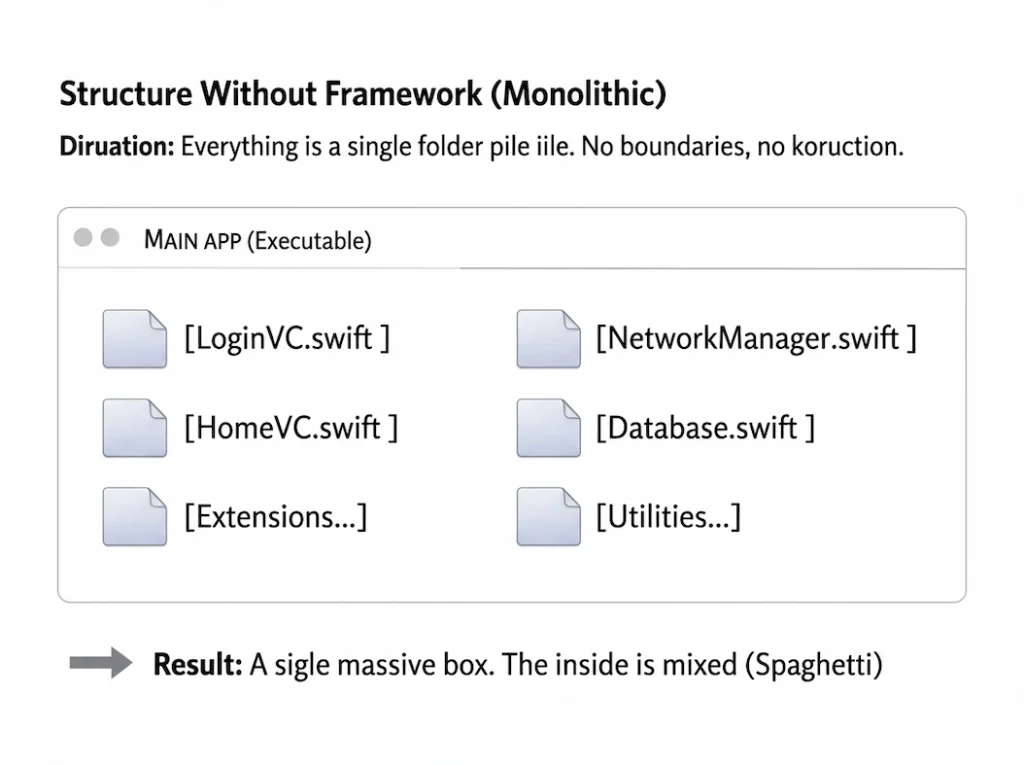
Scenario 1: The Monolithic Approach (No Frameworks)
- The Situation: We dump everything our networking layer, UI code, database models into a single
Appfolder. - The Problem: As the project scales, the codebase quickly turns into “Spaghetti Code.” You tweak one thing, and something entirely unrelated breaks. Furthermore, collaborating with teammates in the same massive files leads to endless “Merge Conflicts.” You lose all modularity.
Scenario 2: Using Dynamic Frameworks
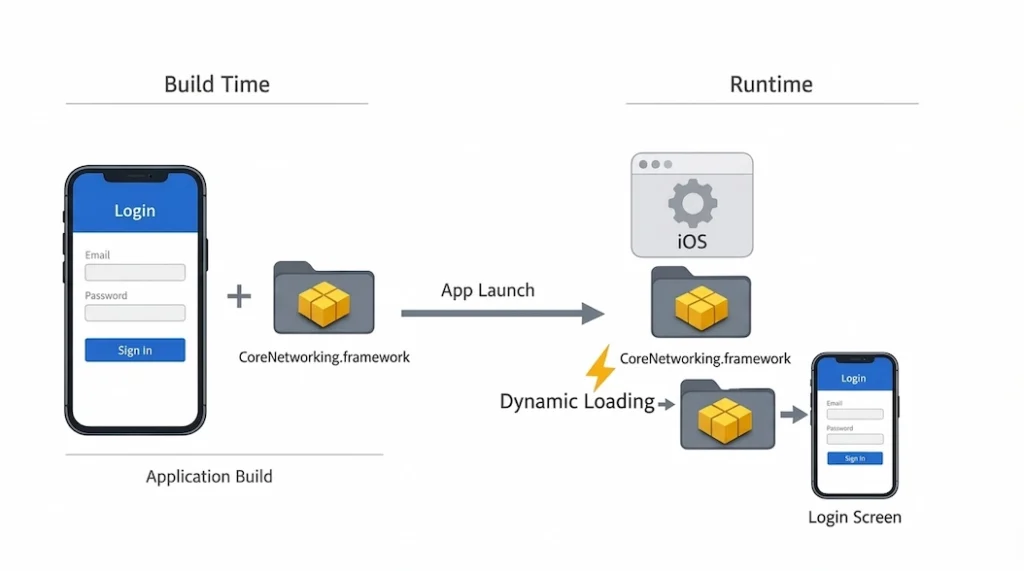
We turn CoreNetworking into a Dynamic Framework. Instead of copying the code into the main app, it sits alongside it as a separate package.
- The Problem:
- Slow Launch Times: As mentioned earlier, the app has to individually load these packages every single time it opens. If you have 50 different modules, your users might get bored and close the app before it even finishes launching.
- Runtime Crashes: Sometimes, a build will succeed without any issues, but when the app actually runs, it fails to locate the dynamic framework. This results in the dreaded
Image not founderror, and the app crashes instantly.
A Clearer Comparison: Architectural Approaches
1. The Monolithic Architecture
In this scenario, files like LoginViewController.swift and NetworkManager.swift sit side-by-side in the same project folder with zero boundaries. The entire codebase is a single block.
- The Advantage:
- Zero Setup: You don’t have to deal with complex project settings or creating custom targets.
- Compilation: It’s often the fastest compilation method for very small projects.
- The Cost:
- Spaghetti Code: As your app grows (especially if you’re building a Super App), boundaries blur. You’ll start seeing database logic leaked inside UI code. Dependency management becomes a nightmare.
- Re-compilation Bottlenecks: Changing a single line of code in the networking layer might force Xcode to re-compile the entire massive project.
- Team Friction: 10 developers working in the same folders means constant merge conflict resolutions, which kills productivity.
2. Dynamic Framework Architecture
Here, we isolate the networking layer and link it to the project as CoreNetworking.framework (Dynamic). When we build the app, the networking code isn’t embedded into the Login screen’s binary. It’s placed next to it. The OS finds and loads it at runtime.
- The Advantage:
- Extension Sharing: If you are building an iOS Widget, both the Main App and the Widget can share the exact same
CoreNetworkingfile without duplicating it. This saves physical disk space.
- Extension Sharing: If you are building an iOS Widget, both the Main App and the Widget can share the exact same
- The Cost:
- Launch Time Penalties: This is the heaviest cost. If you scale up to 50 modules, the OS has to juggle loading 50 distinct files during startup. Users might just delete your app while waiting.
- Runtime Errors: Again, even with a successful build, a failure to load the framework at runtime results in an immediate crash.
3. iOS Static Framework Architecture (Our Preferred Choice)
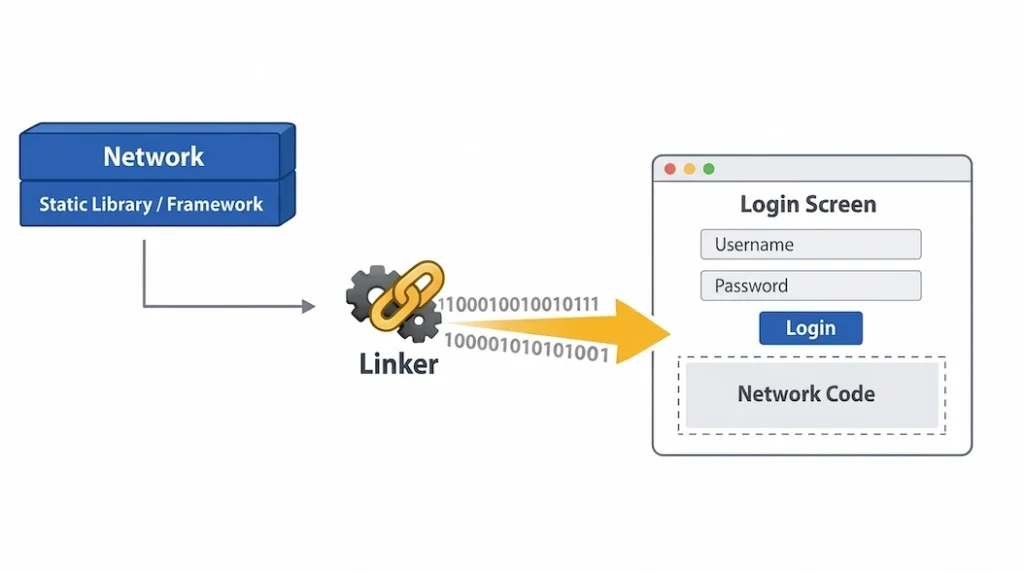
We still separate the networking layer into its own module, but this time, we link it as a Static Library / Framework. During the build process, the Linker steps in, grabs the networking code, and physically merges it into the main executable file containing the Login screen.
- The Advantage:
- Maximum Speed: The OS loads a single file at launch. The overhead cost of loading modules is zero. The app opens instantly.
- Compile-Time Security: Bugs are caught during the build process. Your users will never experience a “Framework not found” error in production.
- Optimization (Dead Code Stripping): The Linker is smart. It detects any code you wrote in the networking layer but never actually used, and strips it out of the final package. This keeps your overall app size lean.
- The Cost:
- Binary Bloat (With Extensions): If both your App and your Widget use the same static library, the code is copied into both targets. This increases the total binary size (though we usually happily pay this price for the faster launch times).
- Re-Linking Time: Even if you change a single letter in the framework, Xcode has to rebuild and re-link the main app’s massive binary.
Our Conclusion: For clean code and a smooth developer experience, we prefer a Modular (Framework-based) architecture. But to guarantee blazing-fast launch times for our users, we link those modules Statically.
Handling “Resource Bundles” (Where Do the Images Go?)
Static Libraries (.a files) only contain compiled CODE. They cannot hold assets like images, .xib files, JSONs, or custom fonts.
- The Problem: When our
CoreNetworkingmodule is static, its code gets copied into the main app, but its images do not. If you try to callUIImage(named: "icon_network"), the app will either fail to load the image or crash outright. - The Solution: When using a Static Framework, we have to create a companion “Resource Bundle” (
.bundle) package.- The code gets embedded into the main binary.
- The images are shipped as a separate package.
- You have to explicitly tell your code: “Don’t look in
Bundle.mainfor this image, look inside my customCoreNetworking.bundle.”
Quick Note: In a static architecture, code merges, but assets separate. Managing this requires a bit of extra effort.
The “Duplicate Symbol” Problem (Dependency Hell)
In large-scale iOS projects, this is the Linker error that will cause the most headaches.
Let’s say we have two separate modules: FeatureA and FeatureB. Both modules rely on a popular third-party library like Alamofire (or my custom CoreNetworking), and they both link to it statically.
- The Problem: When the main app imports both
FeatureAandFeatureB, the Linker looks at the code and realizes thatFeatureAcontains a copy of Alamofire, andFeatureBalso contains a copy of Alamofire. - The Error: The Linker panics and throws a:
Duplicate Symbol Found: Alamofire.request(Essentially asking: “I have two identical functions here, which one am I supposed to use?!”). - The Solution: To solve this “Diamond Dependency Problem,” we are usually forced to link shared sub-dependencies dynamically, or we have to rely on advanced build tools like Tuist or Bazel that strictly manage the dependency graph for us.
The Modern Solution: Mergeable Libraries (The Xcode 15+ Revolution)
Apple noticed that iOS developers were exhausted from constantly balancing the trade-offs between Static and Dynamic frameworks, so they introduced a game-changing technology.
What is it? A new type of framework called a “Mergeable Library”.
How does it work?
- In Debug Mode: It behaves exactly like a Dynamic Framework. This keeps your build times incredibly fast so you can see your changes instantly while coding.
- In Release Mode: The Linker automatically converts them into Static Frameworks and seamlessly merges them into the main app for production.
As many senior developers are now saying: “We used to manually configure static and dynamic targets. Now, as long as we support iOS 12+, we just mark our modules as ‘Mergeable’. We get maximum speed during development, and maximum performance in production.”
Summary
Adopting a Static Framework architecture in large-scale apps is highly recommended, but you need to be prepared to handle a few challenges:
- Resource Management: Static libraries only carry code. You must create custom
Resource Bundlesfor your assets and route your code to the correct bundle. - Duplicate Symbols: If two different modules use the same underlying library statically, you will hit Linker Errors. You must carefully design your Dependency Graph.
- Mergeable Libraries: In modern projects, the best approach is to utilize Apple’s new Mergeable Libraries to create a hybrid architecture fast compiling in Debug, and lightning-fast launch times in Release.
You can check out the My CoreNetworking library (SPM) I mentioned in this article here (click)



3 Comments